
By Marios — founder of pcprice.watch, tracking hardware prices across 7 global marketplaces
Key Takeaways
- 80 Plus Bronze is 85% efficient; Gold is 90%; the electricity savings are small ($5-8/year for a gaming PC) but higher-rated units use better capacitors and carry 7-10 year warranties.
- For most gaming builds, 80 Plus Gold is the right choice — $20-30 more than Bronze for meaningfully better components and quieter fans.
- Size your PSU to roughly double your system’s peak draw for peak efficiency. A 650W unit powering a 300W system runs in the sweet spot.
- Don’t conflate wattage with quality: a 650W Gold from Corsair or Seasonic beats a cheap 850W Bronze every time.
TL;DR: 80 Plus ratings tell you how efficiently your PSU converts wall power to usable power. Bronze is 85% efficient, Gold is 90%, and Platinum/Titanium go higher. Most builders should get 80+ Gold.
What Does 80 Plus Actually Mean?
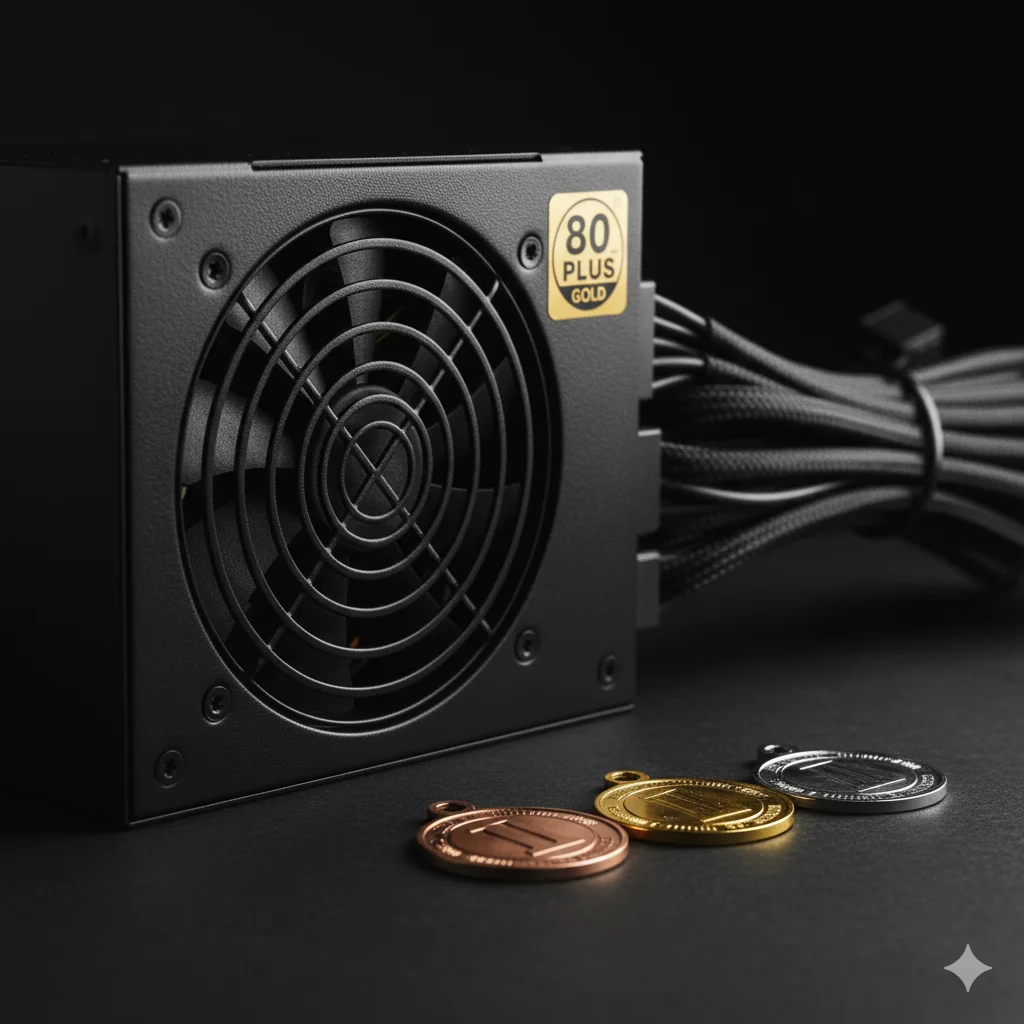
The 80 Plus program certifies that a PSU is at least 80% efficient, meaning for every 100 watts drawn from the wall, at least 80 watts reach your components. Every power supply wastes some electricity as heat during AC-to-DC conversion. The rating tiers measure that waste at three load levels: 20%, 50%, and 100%.
The rating tiers indicate efficiency at 20%, 50%, and 100% load:
| Rating | 20% Load | 50% Load | 100% Load |
|---|---|---|---|
| 80 Plus | 80% | 80% | 80% |
| Bronze | 82% | 85% | 82% |
| Silver | 85% | 88% | 85% |
| Gold | 87% | 90% | 87% |
| Platinum | 90% | 92% | 89% |
| Titanium | 92% | 94% | 90% |
All PSUs peak at 50% load. That’s why people recommend buying a PSU with roughly double your system’s actual draw. A 650W unit powering a 300W system sits right in the efficiency sweet spot.
Does Efficiency Actually Save Money?
Here’s the math. A gaming PC drawing 350W from the PSU, used 4 hours daily, shows modest but real savings when you step up from Bronze to Gold. The difference amounts to roughly 33 kWh per year, which works out to $5-8 annually at average US electricity rates (U.S. Energy Information Administration, 2024).
- Bronze (85% efficient): draws 412W from the wall, ~600 kWh/year
- Gold (90% efficient): draws 389W from the wall, ~567 kWh/year
- Difference: ~33 kWh/year, or roughly $5-8/year at average US electricity rates
Over a PSU’s typical 7-10 year lifespan, Gold saves you $35-80 compared to Bronze. Not nothing, but it’s not the main reason to choose a higher rating.
The 80 Plus certification program is administered by CLEAResult, which tests PSUs at 20%, 50%, and 100% load. All certified units must hit at least 80% efficiency at each load level. Higher tiers (Bronze through Titanium) specify progressively stricter targets. Bronze requires 85% at 50% load; Gold requires 90%. The testing is mandatory for certification, not self-reported (CLEAResult, 2026).
How Much Does Efficiency Actually Cost You in Electricity?
The US-centric $5-8/year figure understates the real cost for European builders. At the EU average electricity rate of €0.30/kWh (Eurostat Energy Statistics, 2025), running a system for 8 hours a day changes the math meaningfully. Here’s what Bronze versus Gold actually costs across a year.
Take a 600W system, which is typical for a mid-range build with an RTX 3070 or RTX 4060. At 8 hours of daily use:
- Gold PSU at 90% efficiency: draws 667W from the wall. Annual draw: 667W × 8h × 365 / 1000 = 1,944 kWh/year
- Bronze PSU at 85% efficiency: draws 706W from the wall. Annual draw: 706W × 8h × 365 / 1000 = 2,061 kWh/year
- Difference: 117 kWh/year × €0.30 = ~€35/year
Over five years, that’s roughly €175 in saved electricity. A Seasonic Focus Gold 650W retails for around €90-110 new; a comparable Bronze unit runs €60-80. The price gap is €20-30, and the electricity math closes it in under a year.
So why the nuance? The conclusion isn’t “always buy Gold for the electricity savings.” It’s that the electricity savings are a bonus, not the justification. Buy Gold for the better capacitors, quieter fan, and longer warranty. The electricity savings are a free side effect.
Workstation builders with systems running 24/7 see a completely different picture. At 24 hours daily use, the same 117 kWh/year difference triples to ~350 kWh/year, or €105/year saved. Over five years that’s €525 — enough to justify Platinum or even Titanium at the buying stage.
Citation capsule: At the EU average electricity rate of €0.30/kWh, a 600W system running 8 hours daily costs roughly €35 more per year to run on an 80 Plus Bronze PSU (85% efficient) versus Gold (90% efficient). Over five years that’s ~€175 in extra electricity costs. The typical Bronze-to-Gold price premium is €20-30, meaning the electricity savings alone recover the upgrade cost within the first year (Eurostat, 2025).
The Real Reason Ratings Matter: Build Quality
Higher-rated PSUs almost always use better internal components. That’s the practical difference that matters most for longevity and system stability. In practice, you’re paying for quieter fans, better capacitors, and a warranty that reflects real manufacturer confidence.
Bronze units typically use:
- Sleeve-bearing fans (louder, shorter lifespan)
- Lower-grade capacitors (often rated to 85°C)
- 3-5 year warranties
- Group-regulated designs on cheaper models
Gold units typically use:
- Fluid dynamic or rifle-bearing fans (quieter, longer lasting)
- Japanese capacitors rated to 105°C
- 7-10 year warranties
- DC-DC converter topology for better voltage regulation
Platinum/Titanium units add:
- Semi-passive fan modes (fan stops under low load)
- Fully modular cables
- 10-12 year warranties
- Tighter voltage regulation for sensitive components
Warranty length is the most honest signal of build quality. Manufacturers know their failure rates. A PSU with a 10-year warranty from Seasonic or Corsair reflects actuarial confidence that the unit will last that long under typical use. Bronze units with 3-year warranties aren’t being pessimistic — they’re being accurate about their component grades.
Modular vs Non-Modular: What’s the Difference?
Modularity is separate from the 80 Plus rating, but the two often go together. It’s worth knowing what you’re getting before you buy.
- Non-modular: All cables are permanently attached. Cheaper, but unused cables clutter your case and restrict airflow.
- Semi-modular: Essential cables (24-pin ATX, 8-pin CPU) are fixed; GPU and peripheral cables detach. Good middle ground.
- Fully modular: Every cable detaches. Easiest to build with, best airflow, and it allows custom cable kits.
Most Gold-rated PSUs are semi or fully modular. Most Bronze units aren’t. That’s the general trend, though exceptions exist in both directions.
PSU Wattage for Common GPU Builds
Sizing your PSU correctly is as important as choosing the right efficiency tier. The table below covers the most common Nvidia GPU builds. Minimum wattage keeps the system stable; recommended wattage adds headroom for CPU boost, fans, storage, and brief GPU power spikes during boost cycles. Always check your GPU manufacturer’s minimum before buying.
| GPU | Minimum PSU | Recommended PSU |
|---|---|---|
| RTX 3060 | 650W | 750W |
| RTX 3070 | 650W | 750W |
| RTX 3070 Ti | 750W | 850W |
| RTX 3080 | 750W | 850W |
| RTX 4060 | 550W | 650W |
| RTX 4070 | 650W | 750W |
These figures assume a modern mid-range CPU (Ryzen 5/7 or Core i5/i7), two storage drives, and standard case fans. High-end CPUs like the Ryzen 9 7950X or Core i9-13900K add 50-100W at full load — account for that when sizing.
The RTX 3070 Ti and RTX 3080 both pull around 290-320W under load. A 750W Gold unit running one of those systems at typical load sits at 40-50% capacity — right in the efficiency sweet spot. That’s the exact scenario where the 50% load efficiency number on the certification chart matters most.
Citation capsule: NVIDIA’s recommended PSU for the RTX 3070 Ti is 750W minimum, and 850W for the RTX 3080 (NVIDIA Product Pages, 2026). A Gold-rated 850W unit running either card at peak load sits at roughly 40-50% capacity — the optimal range for both efficiency and longevity.
How Much Wattage Do You Need?
Match your PSU to your GPU, since it draws the most power. The table below covers the most common gaming tiers. Each linked card page on pcprice.watch shows current eBay pricing alongside TDP figures, so you can size your PSU and budget at the same time.
| GPU Tier | Example Cards | Recommended PSU |
|---|---|---|
| Budget | RTX 3060, RX 6600 | 550W |
| Mid-range | RTX 4060, RX 7700 XT | 650W |
| High-end | RTX 4070, RX 7900 XT | 750W |
| Flagship | RTX 4090 | 850W+ |
These recommendations include headroom for the rest of your system and future upgrades. Always check your GPU manufacturer’s minimum PSU recommendation.
The 50% load efficiency rule is why oversizing makes sense. A 750W PSU running a 320W RTX 3080 build sits at 43-50% load, right in the efficiency sweet spot. A 550W unit powering the same build runs at 58-65% load. That’s still efficient, but it leaves less headroom for brief power spikes during GPU boost cycles.
Should You Buy a Used PSU?
A PSU is one of the few PC components where the used market carries real risk. Used GPUs fail and you lose the GPU. A failing PSU can take other components with it — CPU, motherboard, RAM, GPU all on the same power rail. That asymmetric failure risk changes the calculus entirely. Used PSU sales on eBay account for a small fraction of total PSU listings, and reviews of used units from unknown sellers are unreliable signals (pcprice.watch market observation, 2026).
When buying used is acceptable:
- The seller has a specific unit (brand, model, wattage) with confirmed age under 3 years
- It’s a brand-name unit: Seasonic, Corsair, be quiet!, EVGA, Fractal Design
- The seller can provide the original purchase receipt or invoice
- The unit was from a regular desktop build, not a server or mining rig
When to avoid a used PSU:
- Age is unknown or the seller says “pulled from a working system” without specifics
- It’s a budget or no-name brand — those capacitors start degrading fast
- The listing mentions “used for mining” or “from crypto rig” — mining rigs run PSUs at 80-90% continuous load, which accelerates capacitor aging significantly
- The asking price is close to new retail — there’s no reason to accept the risk
How to do a quick burn-in test if you do buy used:
Run Prime95 (CPU stress) and Furmark (GPU stress) simultaneously for 30 minutes. Watch for system instability, unexpected shutdowns, or voltage fluctuations in HWiNFO64. A healthy PSU handles this without complaint. Any shutdown, reboot, or instability under combined load is a red flag — return it immediately.
Capacitor aging is the primary failure mode in older PSUs. Electrolytic capacitors degrade when run hot, when loaded above 80% continuously, or simply with age. A PSU that’s been used in a warm case at high load for 5 years may be near end of life even if it powers on fine today. There’s no consumer-accessible way to test capacitor health without lab equipment.
For most builders, buying a new mid-range Gold PSU in the €60-100 range is the right call. The used PSU market makes sense only for trusted sources — a friend’s known-good unit, or a tested unit from a reputable refurbisher with a return window.
Citation capsule: Electrolytic capacitor degradation is the leading cause of PSU failure, accelerated by sustained loads above 80% of rated capacity and operating temperatures above 40°C (Seasonic Technology, 2026). Used PSUs from mining rigs or unknown-history systems carry meaningful risk of imminent failure. A brand-name unit under 3 years old from a verified source is the minimum acceptable threshold for a used PSU purchase.
See the seasonal GPU buying guide for guidance on timing used hardware purchases more broadly.
What Should You Buy?
- Budget builds under $600: 80+ Bronze 550W is fine. The system draws under 300W and the PSU won’t be under heavy load constantly.
- Mid-range gaming ($600-$1200): 80+ Gold 650W is the standard recommendation. Better components, quieter operation, longer warranty.
- High-end builds ($1200+): 80+ Gold 750-850W. At this budget, the $20-30 premium for Gold over Bronze is trivial.
- Workstations running 24/7: Platinum or Titanium. The efficiency savings add up when the system never shuts off.
Don’t chase wattage over quality. A well-built 650W Gold unit from Corsair, Seasonic, or be quiet! will outlast and outperform a cheap 850W Bronze unit every time.
Use the GPU price tracker to find deals on cards before choosing your PSU wattage.
FAQ
What is the difference between 80 Plus Bronze, Gold, and Platinum?
The ratings measure PSU efficiency at three load levels. Bronze hits 85% efficiency at 50% load, Gold reaches 90%, and Platinum hits 92% (CLEAResult, 2026). Electricity savings between tiers are modest ($5-8/year at US rates, ~€35/year at EU rates), but higher-rated units use better capacitors, run quieter fans, and carry longer warranties — 7-10 years for Gold versus 3-5 for Bronze.
Is 80 Plus Gold worth it over Bronze?
Yes, for most mid-range and high-end gaming builds. Gold costs $20-30 more and delivers meaningfully better internal components — 105°C Japanese capacitors, fluid dynamic fans, and 7-10 year warranties versus the 3-5 years typical of Bronze. At EU electricity rates (€0.30/kWh), the annual energy savings of ~€35 on an 8-hour-daily system means Gold’s cost premium pays back in electricity costs within a year. Buy Gold for the reliability, and treat the electricity savings as a bonus (Eurostat, 2025).
How long do PSUs last?
Quality units from Seasonic, Corsair, and EVGA typically last 8-12 years at normal loads. Capacitor aging is the main failure mode — it accelerates at high operating temperatures and under sustained loads above 80% of rated capacity (Seasonic Technology, 2026). Manufacturers signal their actual confidence through warranty length: a 10-year warranty from Seasonic reflects the company’s actuarial expectation that the unit lasts that long. Budget Bronze units with 3-year warranties aren’t pessimistic — they’re accurate about their capacitor grades.
Does 80 Plus rating actually save money on electricity?
Yes, but modestly. A gaming PC used 4 hours daily saves roughly 33 kWh/year upgrading from Bronze to Gold, around $5-8 per year at average US rates (U.S. Energy Information Administration, 2024). At EU rates of €0.30/kWh running 8 hours daily, the difference widens to ~€35/year. Over a 7-10 year lifespan, that’s meaningful — but the real reason to pick Gold is build quality, not the electricity bill.
What 80 Plus rating should I get for a gaming PC?
80 Plus Gold is the standard choice for mid-range and high-end gaming builds. It’s $20-30 more than Bronze and delivers meaningfully better components, quieter operation, and 7-10 year warranties. Budget builds under $600 can get by with Bronze 550W. Workstations running 24/7 are where Platinum or Titanium starts paying for itself.
How much PSU wattage do I need for gaming?
Size your PSU to roughly double your system’s peak draw for optimal efficiency. Budget builds with cards like the RTX 3060 or RX 6600 need 550W. Mid-range systems with an RTX 4060 or RX 7700 XT need 650W. High-end builds need 750W, and flagship RTX 4090 systems need 850W or more.
Is a cheap 850W Bronze better than a quality 650W Gold?
No. Wattage doesn’t equal quality. A 650W Gold from a reputable brand uses better capacitors, runs cooler, and carries a longer warranty than a cheap 850W Bronze unit. Buy the wattage you need, then spend on quality within that range.
Summary
| Use Case | Rating | Wattage |
|---|---|---|
| Budget build (under $600) | 80+ Bronze | 550W |
| Mid-range gaming ($600-$1200) | 80+ Gold | 650W |
| High-end gaming ($1200+) | 80+ Gold | 750-850W |
| Workstation (24/7 use) | 80+ Platinum/Titanium | 750W+ |
The GPU page on pcprice.watch shows each card’s TDP. Use it to size your PSU before you buy.
Sources:
- 80 PLUS Certification Program — CLEAResult — official certification body and tier definitions
- Corsair — PSU Efficiency Ratings Explained — efficiency tier breakdowns and practical implications
- Seasonic — What Does 80 PLUS Mean? — manufacturer perspective on certification and component quality
- Micro Center — 80 Plus and Cybenetics: What Do Power Supply Ratings Actually Mean? — efficiency testing methodology and real-world impact
- U.S. Energy Information Administration — Electric Power Monthly — US average residential electricity rates
- Eurostat — Electricity Price Statistics — EU average household electricity rates
- NVIDIA GeForce RTX 30 Series Product Pages — official minimum PSU recommendations by GPU model