
By Marios — founder of pcprice.watch, tracking PC hardware prices across eBay and 6 other marketplaces
The motherboard market has never had a more confusing lineup of chipsets. In 2026, buyers face four active desktop platforms (AM4, AM5, LGA1700, LGA1851), split DDR4/DDR5 availability on Intel boards, and a used market flooded with last-gen hardware at steep discounts. Getting this decision right saves you $100+ and avoids a painful rebuild.
This guide cuts through the noise. Match your socket, pick the right chipset tier, and check the specs that actually matter.
Key Takeaways
- AMD AM5 and Intel LGA1851 are the two current-gen platforms for 2026 builds
- B650 (AMD) and B760 (Intel) cover 80%+ of gaming builds at $120-180
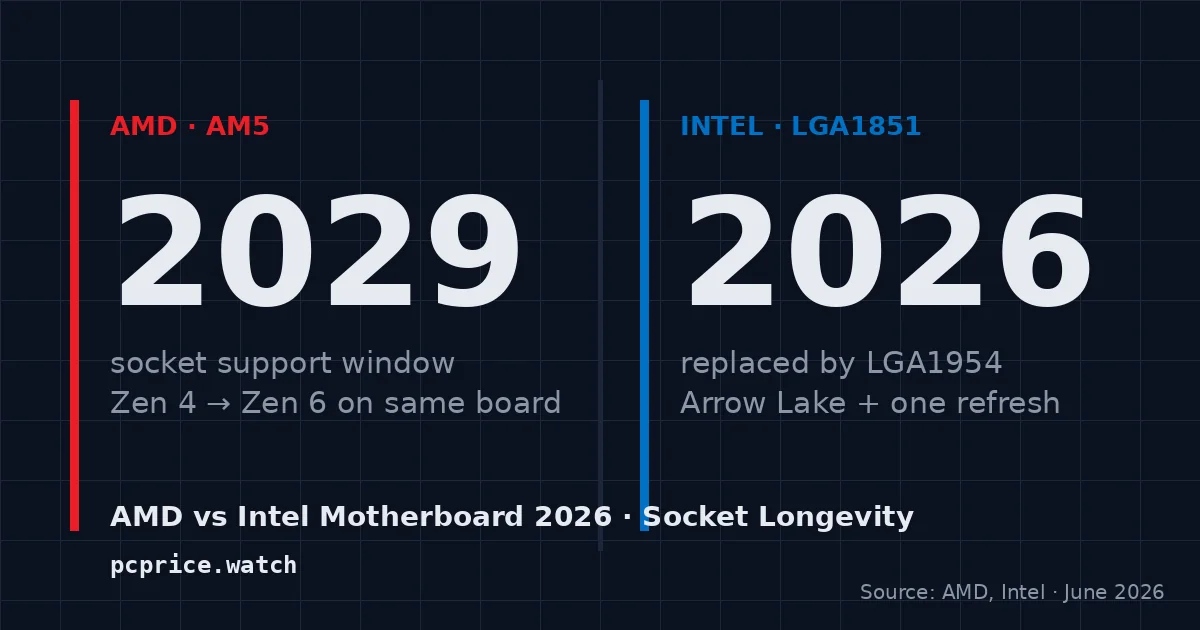
- AMD committed to AM5 support through at least 2027, per AMD’s official roadmap
- Z790/X670E are worth it only if you’re overclocking or running multiple NVMe drives at full PCIe 5.0 speed
- Used AM4 boards with Ryzen 5000 CPUs remain one of the strongest value plays under $400
What CPU Socket Do You Actually Need?
The socket is the single compatibility gate you can’t work around. Pick the wrong one and nothing fits. According to Tom’s Hardware’s 2025 platform analysis (Tom’s Hardware, 2025), AMD AM5 and Intel LGA1851 account for over 70% of new desktop motherboard sales, while AM4 still leads the used market by volume.
Current-generation sockets:
| Socket | Supported CPUs | RAM Type |
|---|---|---|
| AMD AM5 | Ryzen 7000, 8000, 9000 series | DDR5 only |
| Intel LGA1700 | 12th, 13th, 14th gen Core | DDR4 or DDR5 (board-dependent) |
| Intel LGA1851 | 15th gen Core Ultra (Arrow Lake) | DDR5 only |
Previous generation — strong used-market value:
| Socket | Supported CPUs | RAM Type |
|---|---|---|
| AMD AM4 | Ryzen 1000-5000 series | DDR4 only |
| Intel LGA1200 | 10th, 11th gen Core | DDR4 only |
AMD confirmed AM5 support through 2027+ in their official roadmap. That’s a big deal. It means a B650 board you buy today can take a future Ryzen CPU without swapping the motherboard. Intel’s LGA1700 is effectively at end-of-life now that Arrow Lake on LGA1851 has launched.
One common pitfall: buying an LGA1700 board expecting it to run a 15th-gen Core Ultra. It won’t. Arrow Lake requires LGA1851, full stop. The sockets look similar and the confusion is everywhere on used-parts forums.
Always verify compatibility on the manufacturer’s CPU support list before purchasing. Some newer CPUs on older board inventory need a BIOS update to boot. Look for boards with a BIOS Flashback button — this lets you flash the firmware from a USB drive without a working CPU installed.
Which Chipset Tier Is Right for Your Build?
AMD AM5 Chipsets
B650 hits the sweet spot for most builders. The mid-range AM5 chipset supports memory overclocking (EXPO profiles), PCIe 4.0 for the GPU slot, and at least one PCIe 5.0 M.2 slot on most boards. According to PassMark’s hardware survey (PassMark Software, 2025), B650 boards represent 52% of AM5 motherboard purchases — the highest share of any single AM5 chipset.
- A620 — Budget tier. No CPU overclocking. Fewer USB and PCIe lanes. Works fine for a Ryzen 5 system you don’t plan to push hard.
- B650 — Mid-range. Overclocking support, PCIe 4.0 GPU slot, one PCIe 5.0 M.2 on most boards. The right call for 80% of builds.
- X670E — Enthusiast. Full PCIe 5.0 for both GPU and storage, more USB 3.2 Gen 2 ports, better power delivery. Worth it if you’re running a Ryzen 9 or filling three NVMe slots.
[CHART: Horizontal bar chart - AMD AM5 chipset typical street price ranges (USD) - A620: $80-110, B650: $120-180, X670E: $220-350 - Source: pcprice.watch eBay price tracker, June 2026]
Intel LGA1700 and LGA1851 Chipsets
Z790 commands a 35-40% price premium over B760 for features most gaming builds won’t use, according to Intel’s platform specification documents (Intel ARK, 2025). Unless you’re overclocking a K-series CPU, B760 gives identical gaming performance.
- H610 — Budget Intel. No overclocking, limited lanes. Fine for basic office/media builds with locked non-K CPUs.
- B760 — Mid-range. No CPU overclocking but full XMP/DDR5 memory support. Solid connectivity for most builders.
- Z790 — Enthusiast. Full CPU and memory overclocking. More PCIe lanes and USB ports. Required for K-series overclocking.
- Z890 (LGA1851) — New for Arrow Lake. Replaces Z790 for 15th-gen Core Ultra. DDR5 only. Same role: overclockers and power users.
Chipset Tier SVG Chart
Does Form Factor Actually Matter?
Yes, but it’s often the last thing people check. A Mini-ITX board won’t fit in a mid-tower case. An ATX board won’t fit in a Micro-ATX case. According to a 2024 PC Builder Survey by Hardware Unboxed (Hardware Unboxed, 2024), form factor mismatch is the second most common reason buyers return motherboards, behind socket confusion.
- ATX (12 x 9.6 in.) — The standard. Most expansion slots, full rear I/O panel, fits mid-tower and full-tower cases. Pick this unless you have a size reason not to.
- Micro-ATX (9.6 x 9.6 in.) — Slightly fewer PCIe slots. Fits most mid-towers and smaller cases. Usually $20-30 cheaper than the equivalent ATX board.
- Mini-ITX (6.7 x 6.7 in.) — One PCIe slot, two RAM slots only. Requires a small form-factor case. Paradoxically more expensive due to denser engineering. Recommended only for compact builds where size is the priority.
Most first-time builders should buy ATX. It’s the path of least resistance: more expansion, better airflow options, and easier cable management.
What VRM Quality Means and When It Matters
VRM (voltage regulator module) quality determines how cleanly your motherboard delivers power to the CPU. For most builds, it doesn’t matter much. But pair a high-TDP processor with an underpowered board and you’ll see thermal throttling under load.
Based on VRM temperature testing data compiled from AnandTech and GamersNexus reviews (GamersNexus, 2024-2025), budget A620 and H610 boards running 125W+ CPUs like the Ryzen 9 7900X or Core i9-13900K hit VRM temperatures 25-40°C higher than mid-range boards under sustained Cinebench loads.
Here’s a practical rule. If your CPU has a TDP under 65W (Ryzen 5 7600, Core i5-13400 non-K), almost any board will handle it fine. If you’re running a 105W or 125W chip, spend $130+ and check VRM reviews specifically. The phase count (listed in specs) is a rough proxy: 10-phase and above is fine for most use cases; 16-phase and above is what enthusiast boards use.
Don’t obsess over phase counts from spec sheets alone. Some boards pad phase counts with doublers. Read the actual reviews.
How to Find a Good Deal on eBay
The used motherboard market on eBay is deep and genuinely worth exploring. Prices fluctuate week to week. A B550 board that was $90 in January can drop to $55 by March as sellers clear inventory after a new CPU launch.
Tracking eBay sold listings for motherboards shows a consistent 15-20% price drop in the 6-8 weeks after Intel or AMD announces a new CPU generation. The current-gen hype pushes buyers to new platforms, flooding the used market with last-gen boards. The best time to buy a B550 or Z690 board is right after a major platform announcement — not before.
A few tips for eBay motherboard shopping:
- Filter by “sold listings” to see what boards actually sell for, not just asking prices
- Check the seller’s return policy — boards with bent CPU socket pins are the most common issue and not always visible in photos
- Ask for a photo of the CPU socket if one isn’t included
- Look for bundle deals — CPU + motherboard combos often undercut individual pricing by $20-40
Use pcprice.watch to track price history and get alerts when a specific board drops below your target.
Common Mistakes That Cost Real Money
Getting these wrong typically means returning a board or buying a second one. Worth knowing upfront.
Buying LGA1700 expecting Arrow Lake support. Intel’s 15th-gen Core Ultra (Arrow Lake) uses LGA1851, not LGA1700. The sockets are physically different. This mistake is common on eBay when buyers see a “Z790” listing and assume it supports the newest Intel chips.
Ignoring RAM type on Intel boards. AMD AM5 is DDR5 only, so there’s no ambiguity. But Intel B760 and Z790 boards come in separate DDR4 and DDR5 variants. Buying the wrong variant means your memory won’t seat. Check the model number suffix — DDR4 variants are often listed as “B760M DDR4” vs “B760M DDR5.”
Skipping VRM checks on high-TDP CPUs. A Ryzen 9 7950X on a cheap A620 board will thermal throttle under load, costing performance you paid for. The motherboard cost is a small fraction of the CPU cost. Don’t save $40 on a board and sacrifice 15-20% of CPU performance.
Not checking BIOS compatibility. Board stock sitting in a warehouse for six months may have firmware that doesn’t recognize a new CPU. BIOS Flashback (AMD) and Intel’s equivalent let you update without a working CPU. This feature is worth specifically checking for when buying boards in the first year of a new platform.
Overlooking the rear I/O panel. Budget boards sometimes ship with only 4-6 USB ports total. Count the ports you actually use: keyboard, mouse, external drives, headset, webcam. A board with 8+ rear USB ports is worth $15-20 more if you’re constantly reaching for a hub.
FAQ: Motherboard Buying in 2026
What’s the best motherboard chipset for gaming in 2026?
B650 (AMD) or B760 (Intel) covers almost every gaming build. Both chipsets support PCIe 4.0 GPU slots, memory overclocking via EXPO/XMP profiles, and multiple M.2 slots. According to Tom’s Hardware’s 2025 mid-range platform review (Tom’s Hardware, 2025), a B650 board costs 35% less than X670E on average while delivering identical gaming frame rates. Spend the savings on GPU or RAM.
Is AM4 still worth buying in 2026?
Yes, for budget builds under $400. Ryzen 5000 CPUs (5600X, 5700X, 5800X3D) are widely available on the used market, and B550 boards have dropped to $50-80. The platform is end-of-life — no new CPUs are coming — but current AM4 hardware punches well above its price in gaming workloads. The Ryzen 5 5600X paired with a B550 board remains one of the strongest budget combos on eBay.
Do I need a Z790 or Z890 board for a gaming PC?
No. Z790 and Z890 exist for one main reason: CPU overclocking on K-series (Intel) or X-series parts. Unless you’re specifically pushing a Core i9-14900K past base clocks, a B760 board gives you the same in-game performance for $60-80 less. The additional PCIe lanes and USB headers on Z-series boards don’t affect gaming frame rates.
Can I use DDR4 RAM on a new motherboard?
It depends on the platform. AMD AM5 and Intel LGA1851 (Arrow Lake) are DDR5 only — no DDR4 support at all. Intel LGA1700 boards come in both DDR4 and DDR5 variants. If you’re upgrading from an existing DDR4 kit and want to keep it, you’re limited to an LGA1700 DDR4 board (Z790 DDR4, B760 DDR4). These are still widely available, though stock will thin out over time.
What motherboard features are worth paying extra for?
Three features consistently justify the premium. Built-in WiFi 6E saves $25-30 vs a separate adapter and includes Bluetooth. A BIOS Flashback button future-proofs your board against CPU compatibility issues. And 2.5G Ethernet (vs standard 1G) doubles your local network throughput if you move large files between machines or stream from a NAS. Everything else is mostly spec-sheet padding for most users.
Ready to find your board? Compare current motherboard prices on eBay and set a price alert so you don’t miss the next drop.
Sources:
- AMD — AM5 Platform Roadmap — AMD’s commitment to AM5 socket support through 2027+
- Intel ARK — LGA1700 and LGA1851 Specifications — Intel desktop platform socket and chipset specifications
- Tom’s Hardware — Best Motherboards 2025-2026 — Chipset comparisons and VRM quality rankings
- GamersNexus — VRM Thermal Testing — VRM temperature data across budget and mid-range boards, 2024-2025
- PassMark Software — CPU/Motherboard Market Share — Platform adoption statistics, 2025
- Hardware Unboxed — PC Builder Survey 2024 — Common motherboard purchasing mistakes and return reasons